DevTools extension
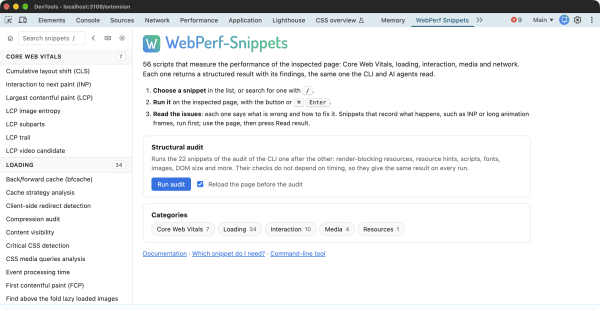
A Chrome DevTools panel that runs the snippets on the inspected page and shows their results: the metric and its rating, the issues with how to fix them, and the items as a table. It runs the same code as the CLI and the agents, without pasting anything into the console.
Beta. The extension installs from a zip, not from the Chrome Web Store. Whether it goes to the store depends on the interest and the feedback on this beta.
Download the extension v0.1.0 beta, zip
What it does
- Lists the 56 snippets by category, with a search (
/), and runs the chosen one on the inspected page (CtrlEnterorCmdEnter). - Shows each result by the return contract (opens in a new tab): the metric and its rating, the issues sorted by severity, the items as a table and the details. A selector in the result opens its element in the Elements panel.
- Runs snippets that record what happens, such as INP or long animation frames: run it, use the page, then press Read result.
- Runs a structural audit: the 22 snippets of the CLI audit workflow, one after the other, on a page it reloads first, as the CLI loads it. Each audit says what changed since the previous audit of the same page: new, changed and resolved issues, and metrics whose rating moved. The panel keeps the last ten audits.
- Copies a result as JSON, downloads an audit as JSON in the shape of
--workflow audit --json, and copies the prompt that runs a snippet with the CLI from an AI agent, with the inspected page in its command. - Works on pages whose Content Security Policy blocks code pasted into the console, since it runs the snippets through the DevTools API.
Install the beta
The extension needs Chrome 120 or later.
- Download the zip and unzip it. Keep the folder: Chrome loads the extension from it.
- Open
chrome://extensionsand turn on Developer mode, at the top right. - Choose Load unpacked and select the unzipped folder, the one with
manifest.json. - Open DevTools on any page and go to the WebPerf Snippets panel. If it is not in sight, it is in the
»menu of the panels.
To update it, download the new zip, remove the extension in chrome://extensions and load the new folder.
Privacy
The extension asks for no permission beyond storage, and runs a snippet only when you press Run or start an audit. It sends nothing anywhere: the results stay in the panel, the last audits in the local storage of the browser, and the settings, the theme and the side of the list, in the storage that Chrome syncs with your account.
Limitations
- It is a beta: expect rough edges.
- It runs in Chrome. Firefox and Safari versions come later, if there is interest.
- The snippets ship inside the extension, so a new version of a snippet arrives with a new version of the extension.
- The DevTools Overrides scripts are not in it: they run before the page, from Local Overrides.
Feedback
Every bug, idea or confusing result helps decide what comes next. Open a feedback issue (opens in a new tab): the form asks for the snippet, what happened, and the result from Copy JSON. The open feedback (opens in a new tab) shows what is already reported.